
























When a request says “1.5 MiB,” you may need a compact, auditable set of equivalent values for a file specification. This guide uses digital-converter to verify the quantity, preserve every prefix, and check whether a byte-based request matches the intended binary size.
Start with the exact binary input
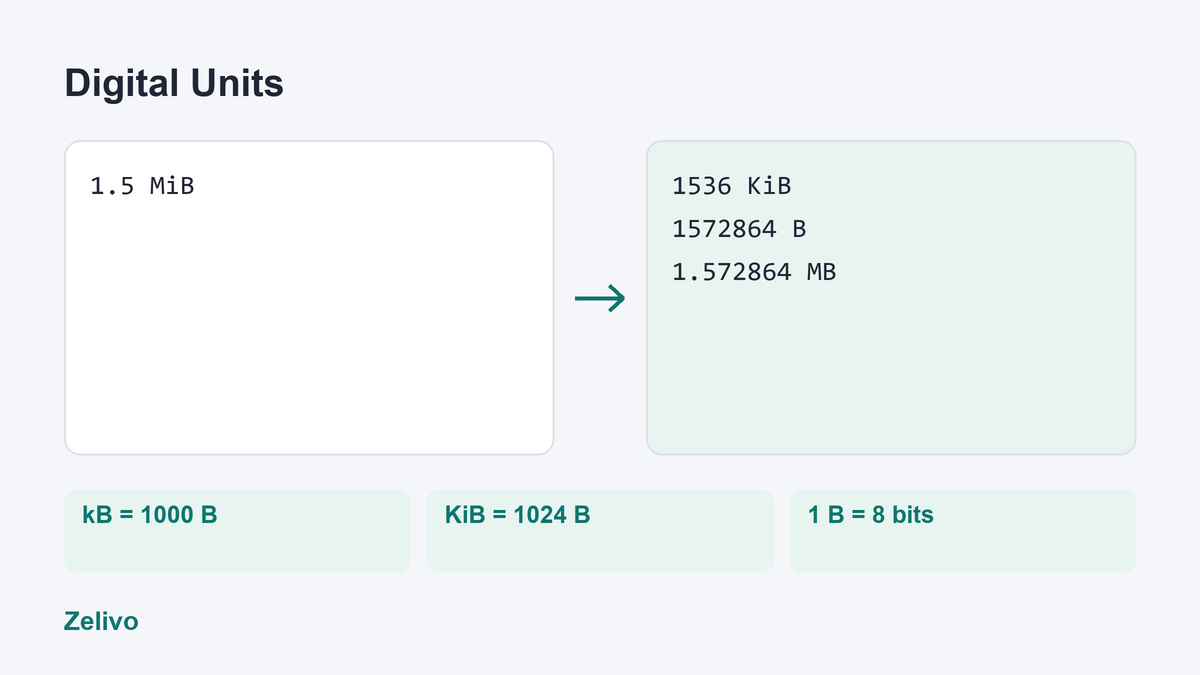
Enter the sample input 1.5 MiB and keep the unit attached exactly as written. The prefix matters: MiB is a binary unit, so its multiplier is based on 1024 rather than 1000. The tool’s first useful comparison is 1536 KiB, because 1 MiB equals 1024 KiB and one-half MiB equals another 512 KiB.
1536 KiB
1572864 B
The same conversion gives 1572864 B. This follows directly from 1.5 × 1024 × 1024 bytes, so the result is reproducible with ordinary arithmetic. Compare the number and unit together, not the number alone. A request for 1572864 B therefore matches the illustrated 1.5 MiB input exactly.
Read decimal comparisons separately
For a decimal comparison, express the same byte count using MB, where MB means 1000-based megabytes. Dividing 1572864 B by 1000000 produces 1.572864 MB. This does not mean MiB and MB are interchangeable; it reports the same underlying byte quantity under a different unit convention. Keep both labels visible when documenting the result.
1.572864 MB
12582912 bits
Bits describe the same storage quantity at a smaller scale: one byte contains eight bits. Multiplying 1572864 B by 8 produces 12582912 bits. The complete expected output is 1536 KiB, 1572864 B, 1.572864 MB, and 12582912 bits. Re-entering 1.5 MiB and reproducing these arithmetic steps provides a simple verification.
Confirm ambiguous labels and scope
Decimal kB is 1000 bytes, although some publishers write KB for that decimal label. Binary KiB is 1024 bytes. Likewise, MB is decimal while MiB is binary. If a request says KB, confirm which definition is intended before comparing values. A byte-based request can be checked directly against 1572864 B, but do not infer a network throughput rate from storage conversion.
To see why the label matters, compare a limit of 1.5 MB with a file of 1.5 MiB. The decimal limit is 1500000 B, while the binary file measures 1572864 B. The file exceeds the limit by 72864 B even though both labels begin with 1.5. Compare the unrounded byte counts before deciding whether a file fits.
Check the number and unit together
- Keep every prefix attached: kB or KB, KiB, MB, and MiB are not interchangeable labels.
- For 1.5 MiB, verify 1536 KiB, 1572864 B, 1.572864 MB, and 12582912 bits.
- When a request uses bytes or ambiguous KB, confirm the definition before accepting the comparison.
